


It’s Me 247 Online Banking
With It’s Me 247 Online Banking you can:
- Check account balances and status
- Generate cleared check listings with optional free copies of check images through CU*CheckViewer
- Work with transaction histories
- Find tax and paid dividends/interest information
- Perform funds transfers
- And much, much more!

To get started, just stop by one of our offices or contact us today to enroll.
CU*Talk Telephone Banking
No access to the Internet for It’s Me 247 Online Banking? We also offer 24 hour telephone access!
1. Using your touch tone phone, call 1-888-749-6040.
2. The computer will then ask you to enter your member number, then #.
3. You will be asked to enter your PIN, then #.
4. From this point on, the CU*TALK procedure will vary depending on the transactions you wish to complete. CU*TALK will guide you through each step.
5. When you have finished your last transaction, simply hang up the telephone.
E-Statements
E-Statements are electronic versions of traditional paper statements that are sent by e-mail rather than traditional mail.
They are identical to the paper versions of statements, they are just sent electronically. E-Statements are accessible via your Online Banking account.
Benefits of E-Statements
• Receive your statement faster than traditional mail
• E-Statements are secure and password protected
• Access your current and past E-Statements anytime through Online Banking
How to enroll
• If not currently enrolled, enroll in Online Banking at any branch with the assistance of a member services representative
• Login to your online banking account and click on the “E-Statements” link on the top of the page
• Confirm you would like to receive e-statements
• After that, begin receiving monthly emails alerting you that your e-statement is available for viewing
Mobile Wallet
Securely pay for purchases using Apple Pay, Google Pay, or Samsung Pay from your phone or mobile device.
Don’t fumble with cash or cards in the grocery store line — just pay with your smartphone or smartwatch. Madison County Federal Credit Union is excited to offer a new, secure payment option for MCFCU credit and debit cards. After activation, all you need to do is wave your smartphone or smartwatch at the terminal to pay.
This contactless, convenient payment system is the most secure way to pay at stores, hotels, or even for online purchases. Mobile Wallet encrypts every transaction, so your credit card, debit card, and account information all remain inaccessible to others.
See who is currently accepting mobile wallet payments in stores and online:


VISA Online
Access your Madison County FCU VISA Online!
Now you have the convenience and flexibility to get a personalized up-to-the-minute summary of your Madison County Federal Credit Union Visa credit card account online.
Any place you can connect to the Web is a place you can:
•Make payments electronically from your Madison County FCU accounts.
•Complete a cash advance by making a transfer from your card to your checking or savings from within It’s Me 247 mobile banking
•Check your account balance and credit line.
•View transactions since your last statement.
•Make member service inquiries.
To ensure your privacy and security while you access your account online, this service supports browsers using the latest SSL 128-bit encryption technology. To begin enjoying the benefits of accessing your MCFCU VISA online, simply log into your It’s Me 247 online banking account. You can also download our MCFCU Mobile App.
For Credit Card Tips from the Consumer Financial Protection Bureau or to learn more about factors to consider when applying for or using a credit card, visit the website of the Consumer Financial Protection Bureau.
Online Billpay
Still paying bills the hard way?
Take advantage of MCFCU’s Bill Pay and quickly find that paying bills has never been easier!
Online Bill Pay is convenient, economical, and gives YOU control over your bills. Try it once and you will quickly see that making payments has never been simpler and the benefits are endless.
Bill Pay Benefits
- It saves you postage. Save over $50 a year if you pay 10 bills a month.
- Use it as often as you like. There’s no limit on the number of bills you can pay.
- It’s easy. Setting up and paying bills online from your computer or mobile device is simple and fast. Funds come directly from your debit/checking account.
- It’s convenient. Choose payment frequency options: one-time, monthly, weekly, quarterly, and more.
- It’s safe. Paying bills online is safer than mailing personal checks.
- No Additional Cost. Bill Pay is included with your Debit/Checking Account.
What you can do with Bill Pay
- Manage all your bills and make payments from one secure site
- Send checks to anyone for anything – from babysitting to birthdays
- Schedule one-time and recurring payments
- View pending and recent bill payments as well as history.
- Sign up to receive electronic versions of your paper bills with E-bills.
- Modify or cancel pending bill payments and transfers up until they begin processing.
- Set up payment reminders and notifications of when payments are received
It’s easy to get started
1. Enroll in Online Banking (if you’re not already enrolled). If you’re not enrolled in Online Banking, call or stop by the office to complete the initial set up. Your online banking account will need to be activated before proceeding to the next step
2. Log in to It’s Me 247 Bankin
2. Select the “Pay & Transfer” tab
3. Step-by-step point and click instructions will guide you through Bill Pay enrollment and setup.
4. Complete a few easy steps and you’re enrolled
5. After allowing for processing (approximately 24-48 hours), you’ll be ready to go. Just come back to It’s Me 247 and click the Pay & Transfer tab again and choose the Bill Pay home icon!
MCFCU New Mobile App
With MCFCU’s New Mobile Banking App You Have Access To Your Accounts Anytime From Anywhere.

- View your account summary
- Make transfers
- Pay bills
- Check rates
- View locations
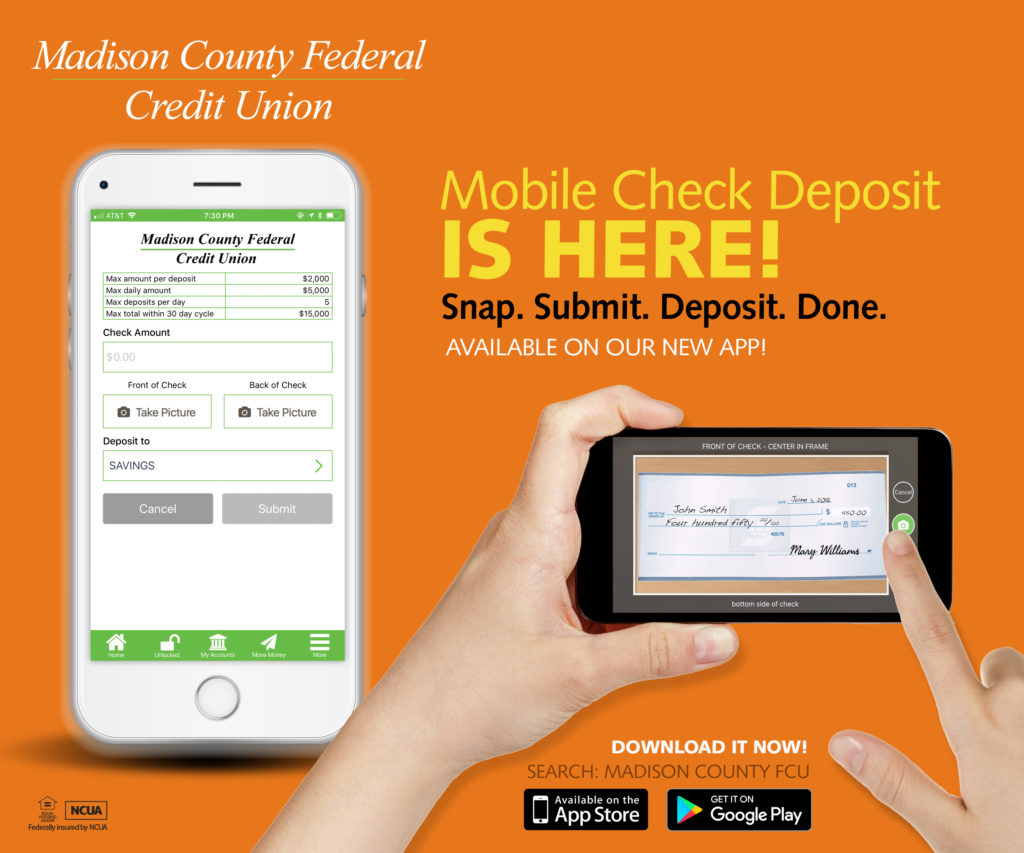
- Use Mobile Check Deposit
- Allows you to remotely deposit your checks without having to visit a branch or ATM
- Snap a photo of the check(s) you want to deposit with your smartphone
- Fill in dollar amount and account, then click “Make a Deposit.”
Mobile Banking Access:
- Must enroll in It’s Me 24/7 online banking first
- Download our Mobile Banking app via App Store on your mobile device



Featuring NEW Account Login Options Available ONLY on the Mobile App
- Fingerprint Recognition
- Voice Recognition
- Face Recognition
- Use a PIN
- Use your Standard Username and Password